This site started as a stock copy of Beautiful Jekyll, the theme by Dean Attali. It still runs on it, but most of what you see now is mine: a custom home page, a Projects page grouped by topic, a Recipes page grouped by course, and about 2,300 lines of CSS on top of the theme. This post covers what I changed and how a change gets from my repo to furtkevic.com.
The source is in my GitHub repo DovarFalcone/dovarfalcone.github.io. GitHub Pages builds it from the gh-pages branch.
Where each page gets its content
Beautiful Jekyll gives you one paginated feed of every post. With horse show data, sleep data, home lab notes, and 44 recipes all in that one feed, it was hard to find anything.
So the pages are now built from two folders of posts and a few small lists in _data/:
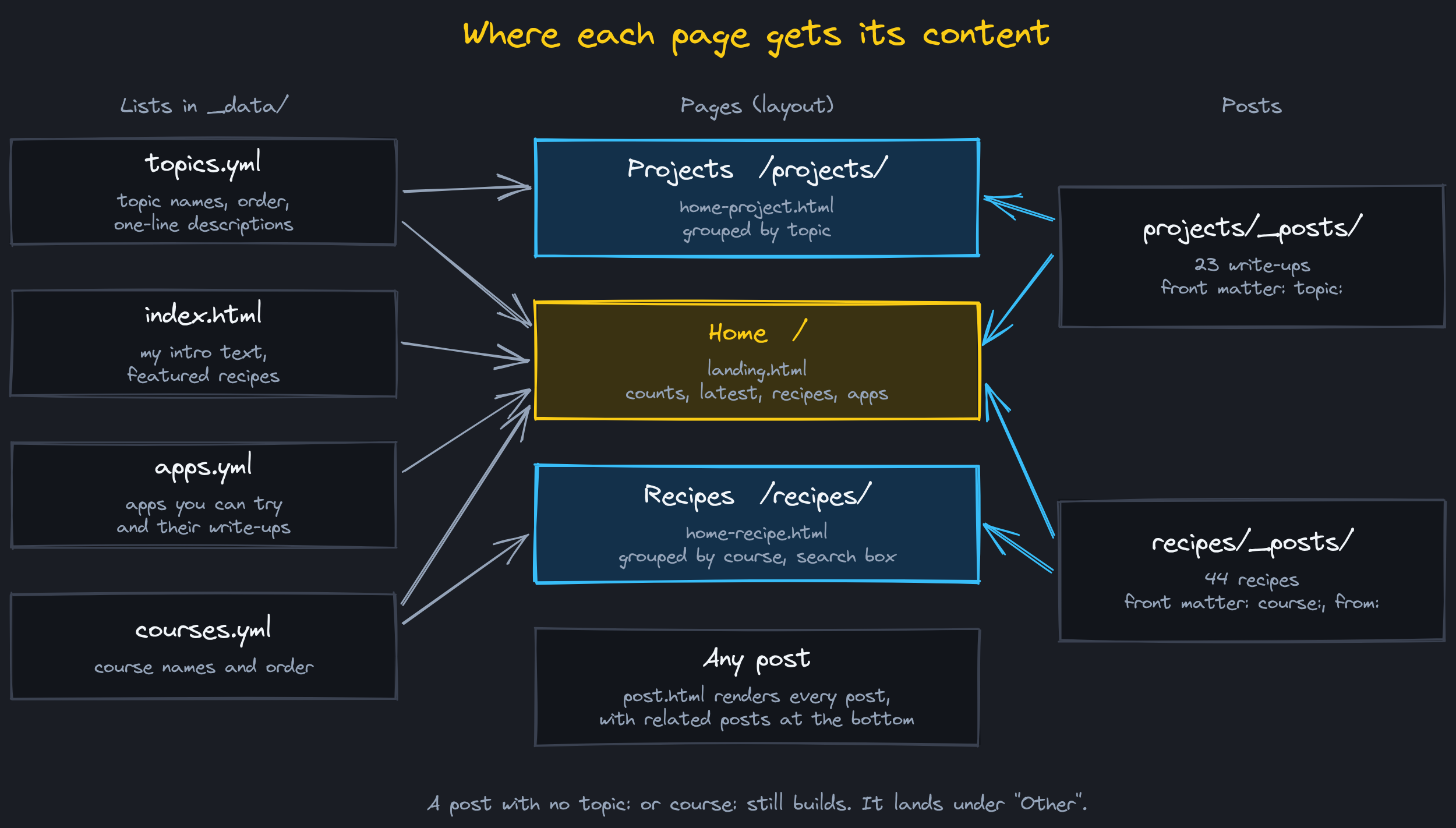
- Home (
_layouts/landing.html). The intro text comes fromindex.html. Below it are counts per topic and course, the five latest projects, four featured recipes picked by slug inindex.html, and the apps from_data/apps.yml, each with a link to its write-up. - Projects (
_layouts/home-project.html). Every project post setstopic:in its front matter, and the page groups posts in the order of_data/topics.yml. A topic can setorder: oldest, which I use for the sleep data series so Part 1 comes first. - Recipes (
_layouts/home-recipe.html). Every recipe setscourse:andfrom:. The page groups them by course in the order of_data/courses.ymland has a search box that filters by recipe name or by the family member it came from. Type “Grammy” and you get Grammy’s recipes.
A post with no topic: or course: still builds. It shows up under “Other” at the bottom of the page.
Adding a new topic is one entry in topics.yml. I don’t have to touch a layout.
Recipe pages
Each recipe is a Markdown file with an ingredients table and a numbered list of steps. I wanted the ingredients beside the steps, like a cookbook, without adding HTML to 44 files.
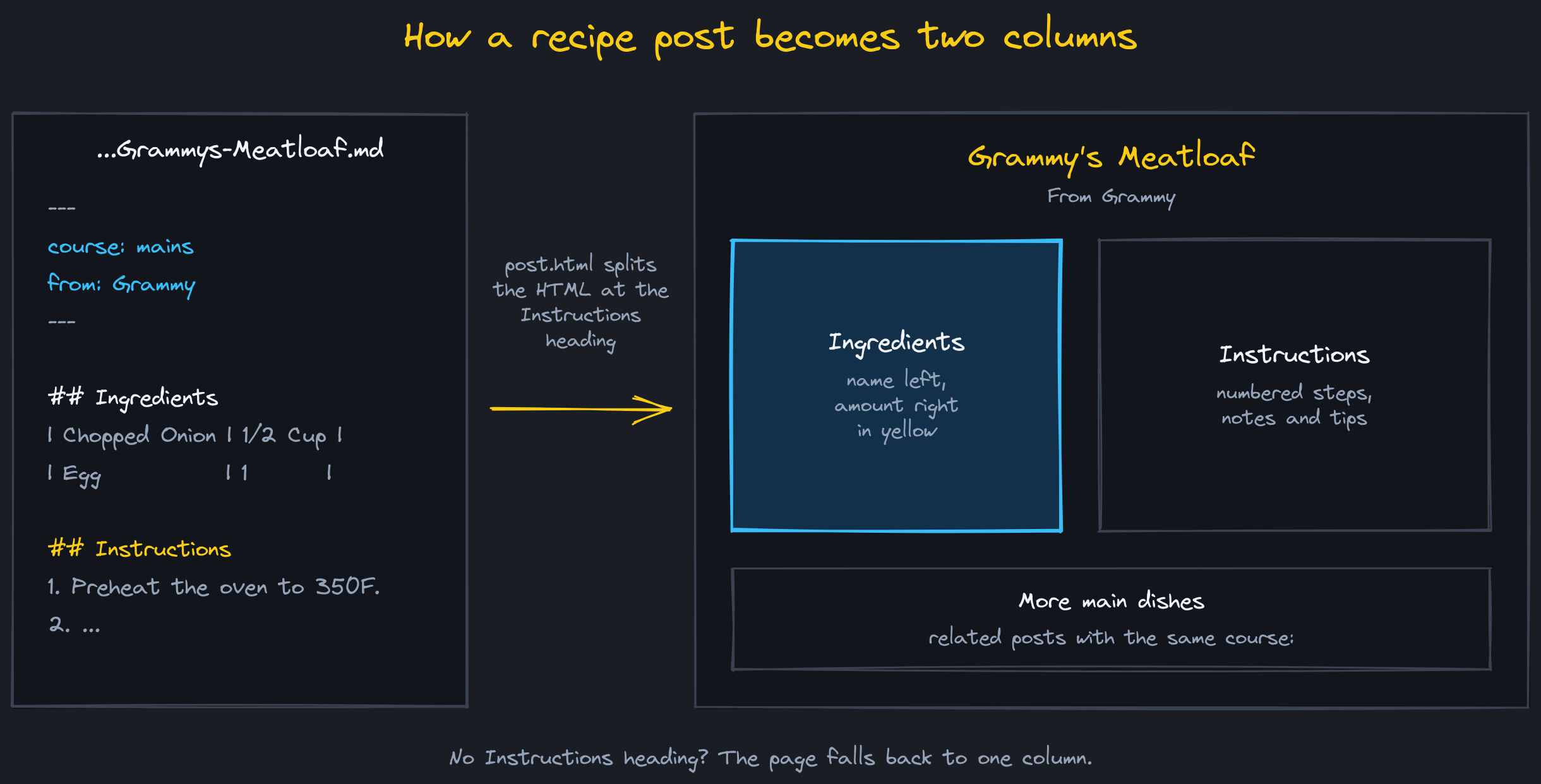
_layouts/post.html takes the rendered HTML of a recipe and splits it on the <h2 id="instructions"> heading. Everything before it goes in the left column, everything after goes in the right. If a recipe doesn’t have that heading, it stays in one column. The ingredients table is styled as a list, name on the left and amount on the right in yellow.
Two other things happen on every post:
- Related posts. Projects show up to four more posts from the same topic, and recipes show up to four from the same course.
- Duplicate titles. A lot of my older posts start with a
#heading that repeats the title, so the title showed twice._includes/strip-leading-title.htmldrops that first heading when it matches the post title and leaves it alone when it doesn’t.
Styles
Everything visual lives in assets/css/custom-styles.css. It loads after the theme’s beautifuljekyll.css and overrides it, so I never edit the theme’s CSS. Colors, fonts, and spacing are variables at the top of the file: slate backgrounds (#1A1D24 and #12151B), yellow #FACC15 for titles, and blue #38BDF8 for links. The font is Inter, with JetBrains Mono for code.
Code blocks gave me trouble. The theme ships a light code theme, and its .highlight pre rule was more specific than my dark one, so code blocks came out as light gray boxes in the middle of a dark page. I fixed the colors and added scripts/check-code-contrast.py, which checks every code token color against the dark background and fails if any are under a 4.5:1 contrast ratio.
The navigation bar and the footer come from navbar-links and footer-links in _config.yml, so adding a page to the menu is a config change.
Redirects
I’ve renamed and merged posts a few times, and I don’t want old links to break. The jekyll-redirect-from plugin handles it. A post lists its old URLs under redirect_from: and the build writes a small page at each old URL that forwards to the new one:
redirect_from:
  - /2026-07-29-hermes-ai-lab/
  - /2026-10-06-agent-fleet-kanban/
  - /2026-10-06-agent-memory-two-stores/
That one is from My AI Setup, which replaced three older posts. The old paginated feed pages, /page2/ through /page14/, now forward to /projects/. The forwarding page uses my own _layouts/redirect.html so it matches the site instead of showing a bare white page.
Links that don’t exist at all get the 404 page, with Officer Barbrady telling you to move along.
From a commit to furtkevic.com
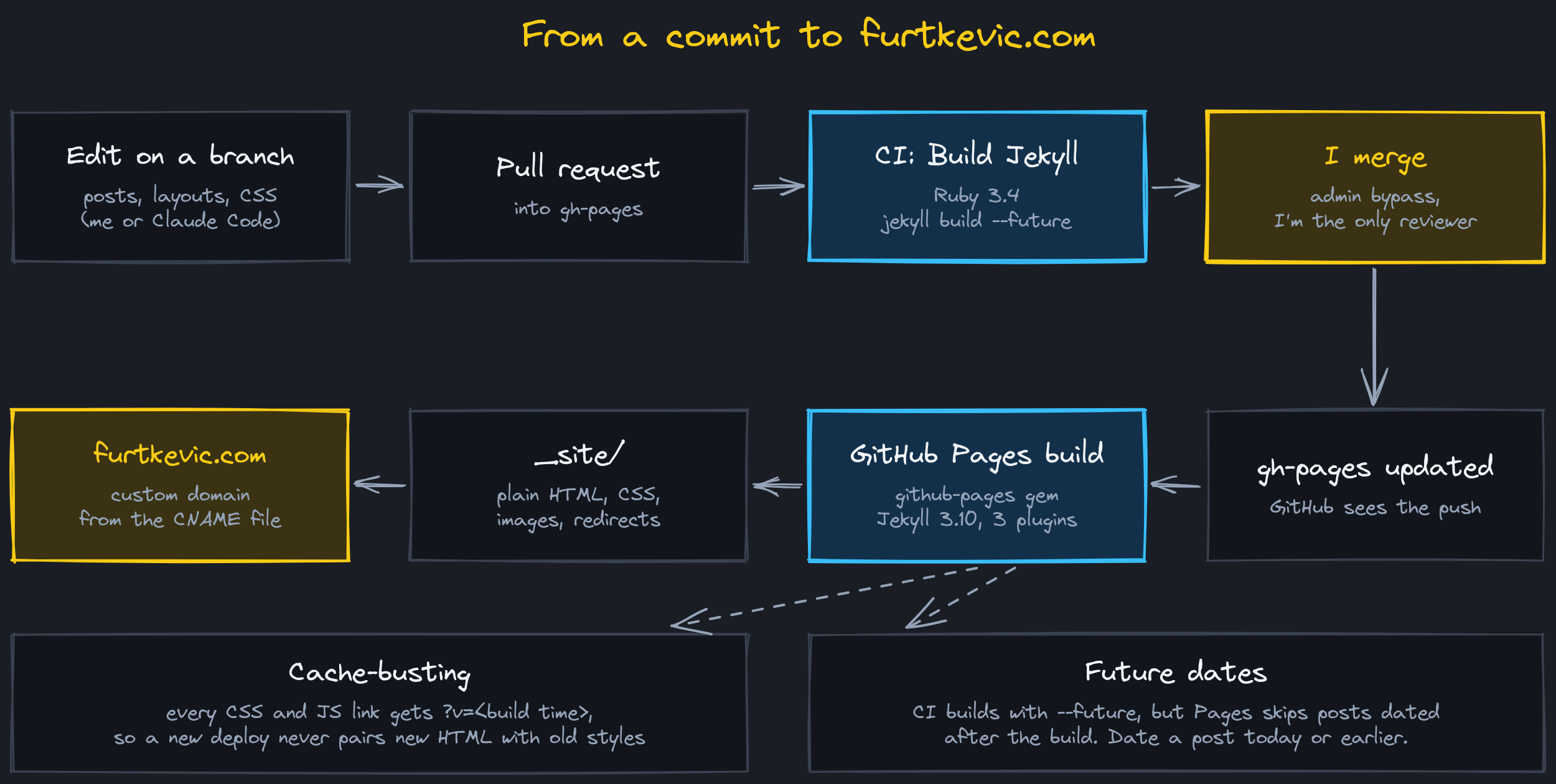
- Edit on a branch. Most changes now come from Claude Code working on a
claude/branch. - Pull request into
gh-pages. The branch rule requires one approving review. - CI runs. The “Build Jekyll” GitHub Actions workflow runs on every push and pull request. It sets up Ruby 3.4 and runs
bundle exec jekyll build --future. If the build breaks, I know before anything merges. - I merge. I’m the only collaborator on the repo, so I merge with the admin bypass checkbox instead of approving my own pull request.
- GitHub Pages builds. The push to
gh-pagesstarts GitHub’s own “pages build and deployment” job. It builds the site with thegithub-pagesgem, which pins Jekyll 3.10 and only allows certain plugins. I use three:jekyll-paginate,jekyll-sitemap, andjekyll-redirect-from. - The site goes live. The output in
_site/is plain HTML, CSS, and images. TheCNAMEfile in the repo tells GitHub Pages to serve it on furtkevic.com.
The Gemfile pins the same github-pages gem, so a local build matches what GitHub runs. Ruby 3.4 dropped base64, bigdecimal, and erb from the standard library, and Jekyll 3 still needs them, so the Gemfile adds them back.
Two problems I’ve had to plan around.
Stale styles after a deploy. Browsers cache CSS, so after a redesign a visitor could get the new HTML with the old styles. Every local CSS and JS link now ends in ?v= plus the build time ({{ site.time | date: '%s' }}), so each deploy has new URLs and browsers fetch fresh files.
Posts that don’t show up. GitHub Pages skips any post dated after the build. CI builds with --future, so it won’t catch that. I date every post today or earlier.
To build it locally:
bundle install
bundle exec jekyll serve
The site is then at http://localhost:4000.
The diagrams in this post were drawn in Excalidraw. The .excalidraw source files are in the repo next to the images in projects/assets/images/site/ if you want to open them.